How the gears work
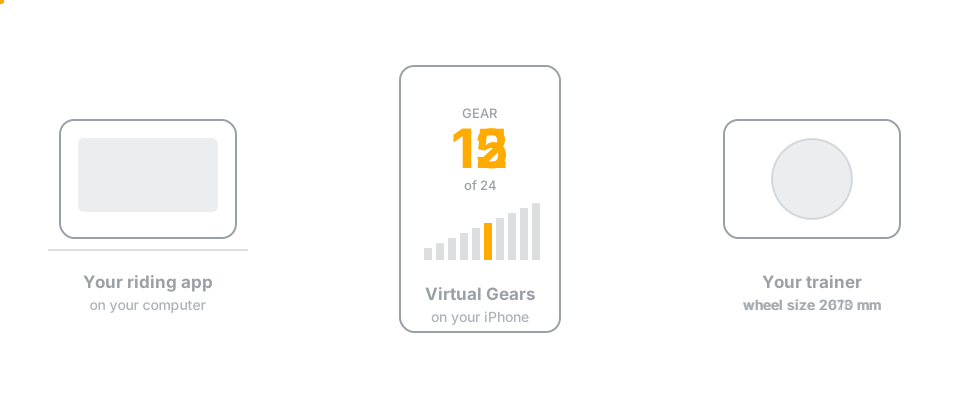
Virtual Gears was built and physically tested with a KICKR V5. Other direct-drive KICKR models are expected to work but have not yet been physically tested. It uses a Wahoo command that changes the trainer's idea of your wheel size: a smaller wheel covers less ground per pedal stroke, which feels like an easier gear. The riding app's own terrain command is left untouched, so the two never fight.
Virtual Gears chooses and displays the gear on your iPhone or iPad. The riding app sees an ordinary FTMS trainer and does not need a virtual-shifting feature of its own.
Opening Virtual Gears connects this transparent trainer proxy. Start Shifting adds the gears; Stop Shifting removes the virtual gear and restores the normal wheel circumference. Neither button starts or stops the ride in the riding app, and stopping shifting leaves that app connected.
The device screen stays awake for as long as this trainer proxy is available. iOS and iPadOS change Bluetooth advertising after the device locks, which can make a waiting trainer disappear from riding apps on Windows and other computers.
The gear your bike is parked in
Your bike does not shift at all. It sits in one gear for the whole ride, and that gear is half of what your legs feel:
feel = parked gear ratio x the wheel size we set
Virtual Gears only controls the second half, so it has to be told the first. Skipping the question does not make it go away — it just means assuming an answer. And "a quiet, straight chain line" is true of a lot of very different gears:
| Parked in | Ratio | If the app had assumed 2.4 |
|---|---|---|
| 31-tooth ring, Zwift Cog | 2.21 | about 8% easier than shown |
| Small ring, middle cog | 2.43 | almost exactly right |
| Big ring, middle cog | 3.33 | about 39% harder than shown |
| Big ring, smallest cog | 4.55 | 90% harder — the easy half of the ladder would not exist |
The step sizes stay right either way, because the scaling is relative. What moves is the whole ladder, which is why this would never look like a bug: the shifting feels fine, the gears are simply not the ones on screen.
So Virtual Gears asks once, and makes the good answer the default. It works out the quietest gear that still keeps every gear reachable — the trainer's wheel-size command tops out at 6553.5 mm, which puts a hard floor under how easy a parked gear can be — and recommends that. Confirm it, or say what you actually used.
Indoors the trainer is the loudest thing in the room and its flywheel speed comes from the parked ratio, so a middle cog on the small ring runs around half the flywheel speed of the big ring on the smallest cog. Because the app compensates for whatever you confirm, the parked gear can be chosen purely for quiet.
Where the gears sit
Every gear is scaled away from the optional Wheel circumference in Settings, 2105 mm (700×25 road) by default, and from the gear the bike is parked in. The default ladder reaches about four times easier and 2.3 times harder while keeping gear 12 as the starting point. A drivetrain too wide to fit, or a parked gear that would put part of the ladder out of the trainer's reach, is refused at setup rather than mid-ride.
The starting gear is a declared number rather than one derived from the safety limits, so editing an unrelated limit cannot quietly move which gear you begin in.
When the riding app has its own idea
Wheel size is part of the standard interface available to every riding app. Whenever one sets it, Virtual Gears honours it: that size becomes the new reference and every gear is rebuilt around it, so the gear you are in keeps feeling the way it did. Virtual Gears supports wheel sizes from 1800 mm to 2400 mm, which covers every real bicycle wheel; anything outside that is declined and the ride carries on at the size it already had.
If the riding app sends no size, the saved normal circumference is used. If it does send one, its value takes precedence and is restored when shifting stops.
Shifting waits for the trainer
Asking for a gear and getting it are not the same thing. Virtual Gears asks for the next gear only once the trainer has confirmed the last one, so holding a shift button sweeps through gears at whatever pace the trainer can really manage and stops the moment you let go. It cannot run ahead and hand you gears you did not ask for.
Measured on a Wahoo KICKR V5, a gear change is confirmed in 59 to 238 ms, averaging 138 ms.